 Registry Shortcuts 1.4.2
Registry Shortcuts are similar to regular keyboard shortcuts, but instead of referencing a file or folder, they referencing a Registry key. Shortcuts allow you to quickly navigate to the Registry key in the Registry Editor and view the values of that key in Windows Explorer.
After installing Registry Shortcuts, you won't see anything; the commands are hidden and can only be viewed or used by holding down the Shift key and right-clicking. You can create a shortcut by copying the desired key to the clipboard (the clipboard must contain one or more paths before you can proceed). Then, hold down the Shift key and right-click on the desired folder where you want to create the shortcut, from which you will click Registry Shortcuts and then paste from the context menu. Any shortcut created will have the exact key name.
Some useful features
- Direct navigation: Double-clicking will open the exact Registry Editor at the targeted key, bypassing manual tree browsing.
- Preview in Explorer: Selecting a shortcut in Windows Explorer will display the subkeys, values, last modified date, and number in the preview pane for immediate inspection.
- Clipboard integration: Paste copied Registry paths (e.g., from regedit's "Copy key name") via the Shift + right-click context menu to create shortcuts instantly.
- Batch creation: Process multiple paths from the clipboard (line separators) to create multiple shortcuts at once.
Registry shortcuts will be useful for those who frequently work with RegEdit as it provides you with a folder from which you can quickly access. Registry shortcuts will be useful for those who frequently work with RegEdit as it provides you with a folder from which you can quickly access. Enter... Exactly what you need without having to search through the entire directory tree. Create as many folders containing shortcuts as you like. Clicking on a created shortcut will automatically open it in RegEdit without having to launch it manually.
- WSCC Windows System Control Center 10.0.2.6 Commercial
 The software allows you to install, update, execute and organize the utilities from the system utilities different
 - Victoria 5.37
 A program that functions to analyze your hard drive will allow people to see health and performance
 - SilentRun Pro 1.0.3
 An easy Windows system software tool that allows you to run multiple programs silently in the background
 - Shutter Pro 4.8
 Utilities scheduling multi-function, friendly interface and easy to use and supports many events and different actions
 - RainbowTaskbar 3.2.2
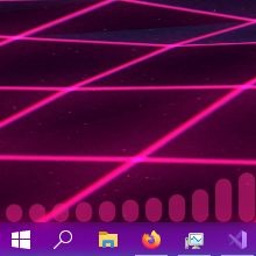 An open source, customizable Windows taskbar, including colors and transitions
 - R@1n ReBirth Activator 1.10 Final
 Activator for all versions of Windows and Office and changes OEM information in system properties
 - EaseUS Windows 11 Checker 2.1.1
 Free Windows 11 upgrade checker for everyone to check if your device can install Windows 11
 - DriverFinder 5.1.0.27
 The software helps find and download drivers for the computer and is capable of backing up and restoring drivers
 - Bennett 1.30
 Easily search for Bluetooth Low Energy/Bluetooth Smart devices and monitor their signal strength
 - Ankh Tech OS Pack 1.0
 All-in-one solution to easily install different Windows versions such as Windows 11/10/7/WinPE